


A finance team approves a contract using an attachment that was saved locally six months ago. A project manager spends half an hour finding the latest drawing. A records manager cannot prove who accessed a sensitive file. These are not isolated administration problems. They are signs that document management system software is needed to bring business information under control.
For organisations handling contracts, invoices, technical drawings, HR files, case records, quality documents and operational procedures, the issue is rarely a lack of storage. The issue is that information is spread across inboxes, shared drives, desktops, paper archives and disconnected applications. The result is slower work, repeated effort and unnecessary risk.
The right system creates a controlled environment where people can find, use, share and govern documents without creating further copies or uncertainty. It should make routine work easier for users while giving IT, compliance and operational leaders the visibility they need.
What document management system software should deliver
A document management platform is more than an online filing cabinet. It establishes a single source of truth for documents across their working life: capture, classification, review, approval, distribution, retention and disposal. That lifecycle matters because a document can be operationally useful and legally sensitive at the same time.
"Split your metadata from your files, and suddenly your sluggish document system becomes fast, scalable and surprisingly cheap to run."
Prasanna Kumar Ramachandran - InforWorld
At a practical level, users should be able to scan paper records, import electronic files, apply metadata and store documents in a logical folder structure. They should then be able to retrieve the right item in seconds through full-text search, filters, document properties and saved searches. When retrieval depends on asking the person who originally saved a file, the organisation does not have a reliable information process.
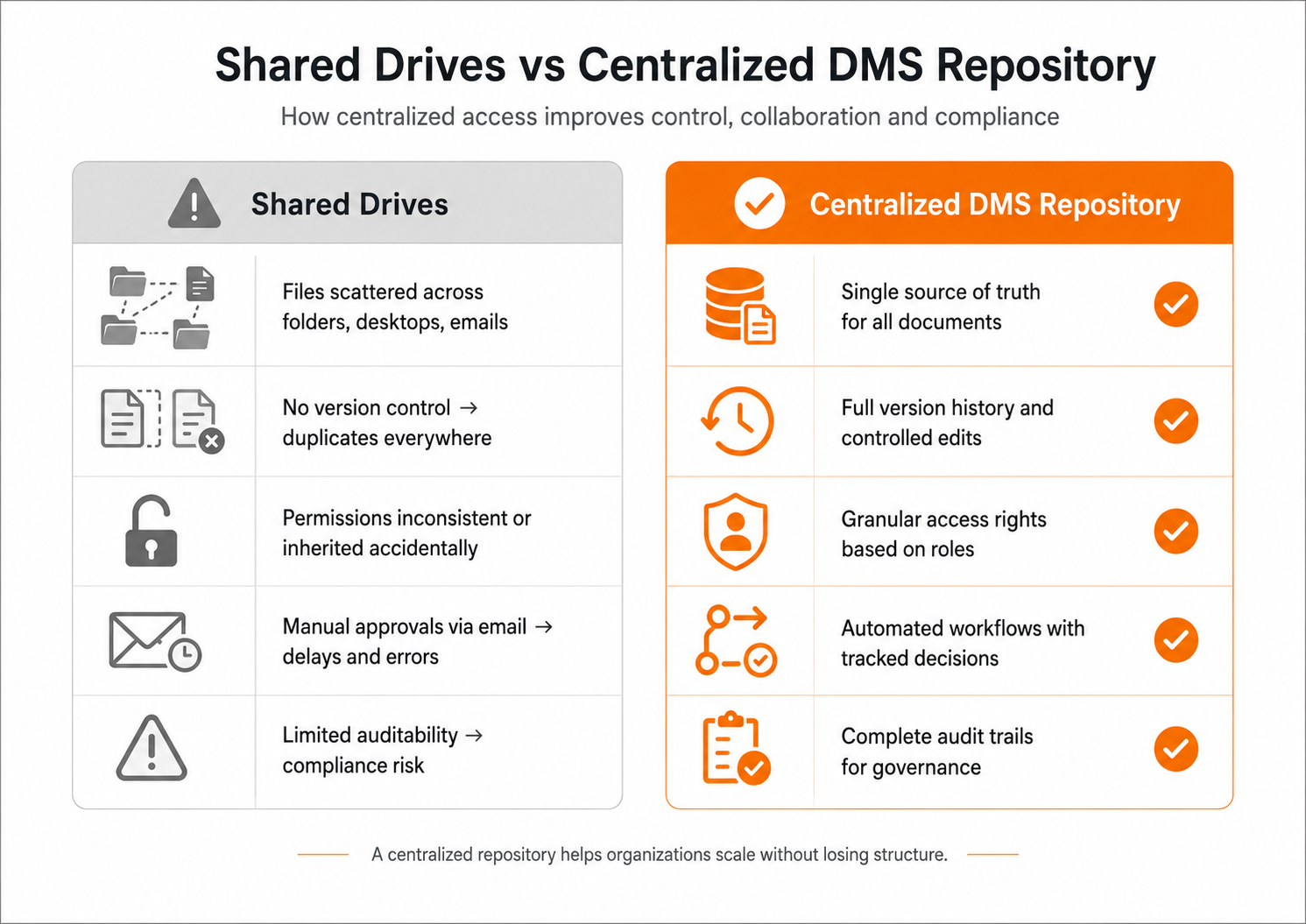
The value grows when document control is connected to daily work. Version control prevents staff from editing outdated copies. Permissions ensure a user sees only the information relevant to their role. Workflow automation routes documents to the right people, records decisions and keeps approvals moving. Audit trails provide evidence of activity when questions arise later.
The operational cost of unmanaged documents
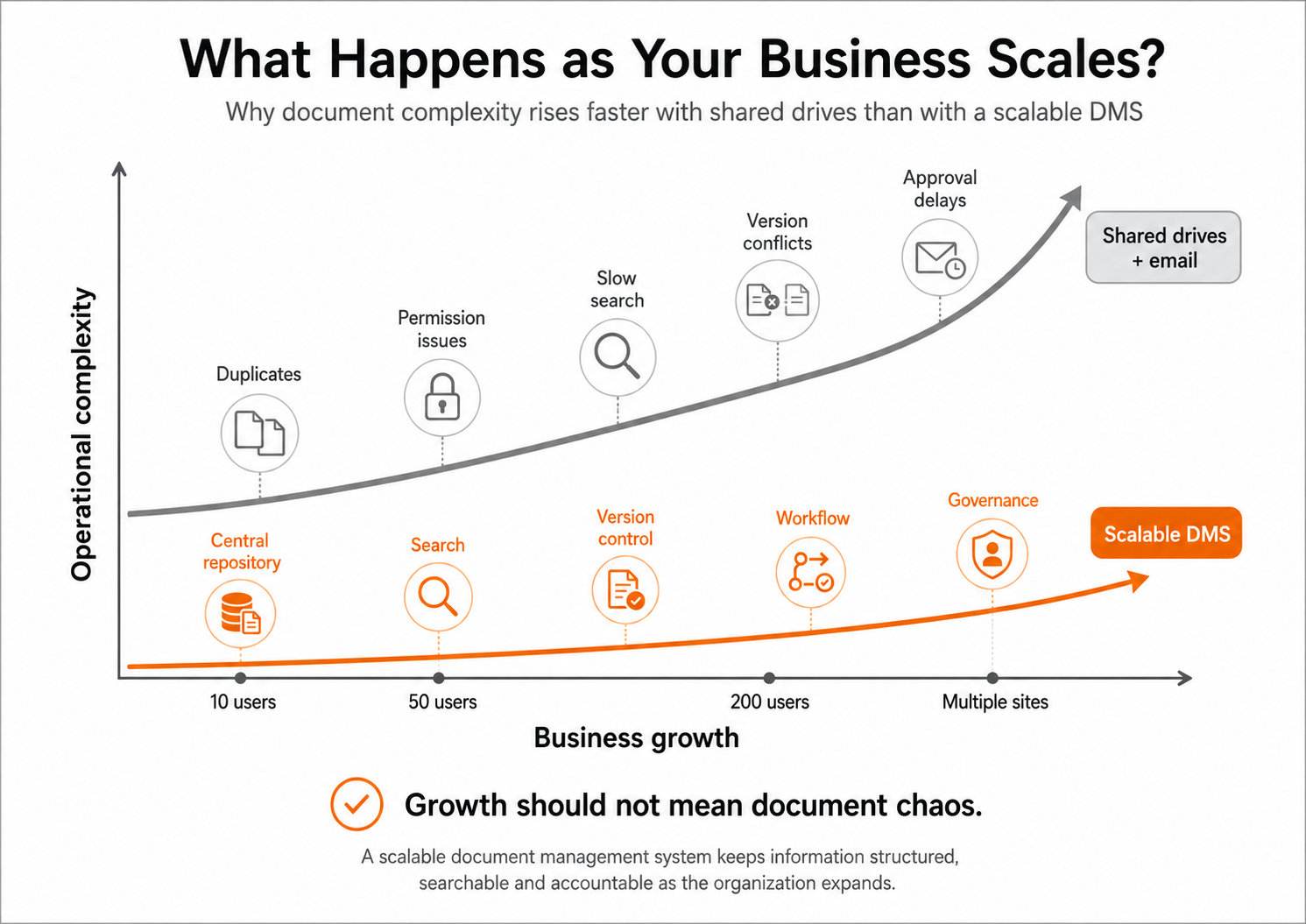
Poor document control is often accepted as an inconvenience until it affects a deadline, an audit or a customer commitment. In reality, the cost accumulates every day. Staff search for files, recreate documents they cannot locate, send large attachments by email and wait for manual approvals. Managers make decisions with incomplete or obsolete information.
Paper-heavy processes add further friction. Physical storage takes space, filing is inconsistent and access is limited to where the archive is held. Remote and multi-site teams can be left working from scanned copies, couriered files or informal workarounds. These arrangements may keep a process running, but they do not provide dependable control.
There is also a governance concern. Organisations need to know which version is authoritative, who has changed it, whether a record must be retained and when it can be disposed of. A shared drive may be suitable for basic file storage, but it does not necessarily provide the structured permissions, retention controls, auditability or workflow needed for business-critical records.
Capabilities that make a measurable difference
Not every organisation needs the same configuration. A small operations team may prioritise fast retrieval and secure sharing, while a regulated enterprise may need detailed retention schedules, delegated administration and integration with line-of-business systems. The core capabilities, however, should work together rather than sit in separate tools.
Central access without losing structure
Centralisation does not mean putting every file into one large folder. It means providing one managed repository with a structure that reflects how the organisation works. Department folders, document templates, metadata fields and naming standards give users a consistent place to store information.
A well-designed system also supports controlled access from the office, home or field. Browser-based and mobile access can help distributed teams respond quickly, but permissions must follow the document wherever it is viewed. Convenience without access control simply moves the risk elsewhere.
Search that works with real business language
Search is one of the clearest tests of a system's value. Users should not need to remember an exact filename or folder path. They may know a supplier name, project number, customer, date, document type or a phrase inside the document.
Full-text indexing and metadata search allow teams to combine those clues and reach the correct information quickly. Optical character recognition is particularly useful for scanned archives, turning image-based documents into searchable business records. This can reduce information retrieval from hours to seconds, especially where years of paper files have been digitised.
Version control and workflow automation
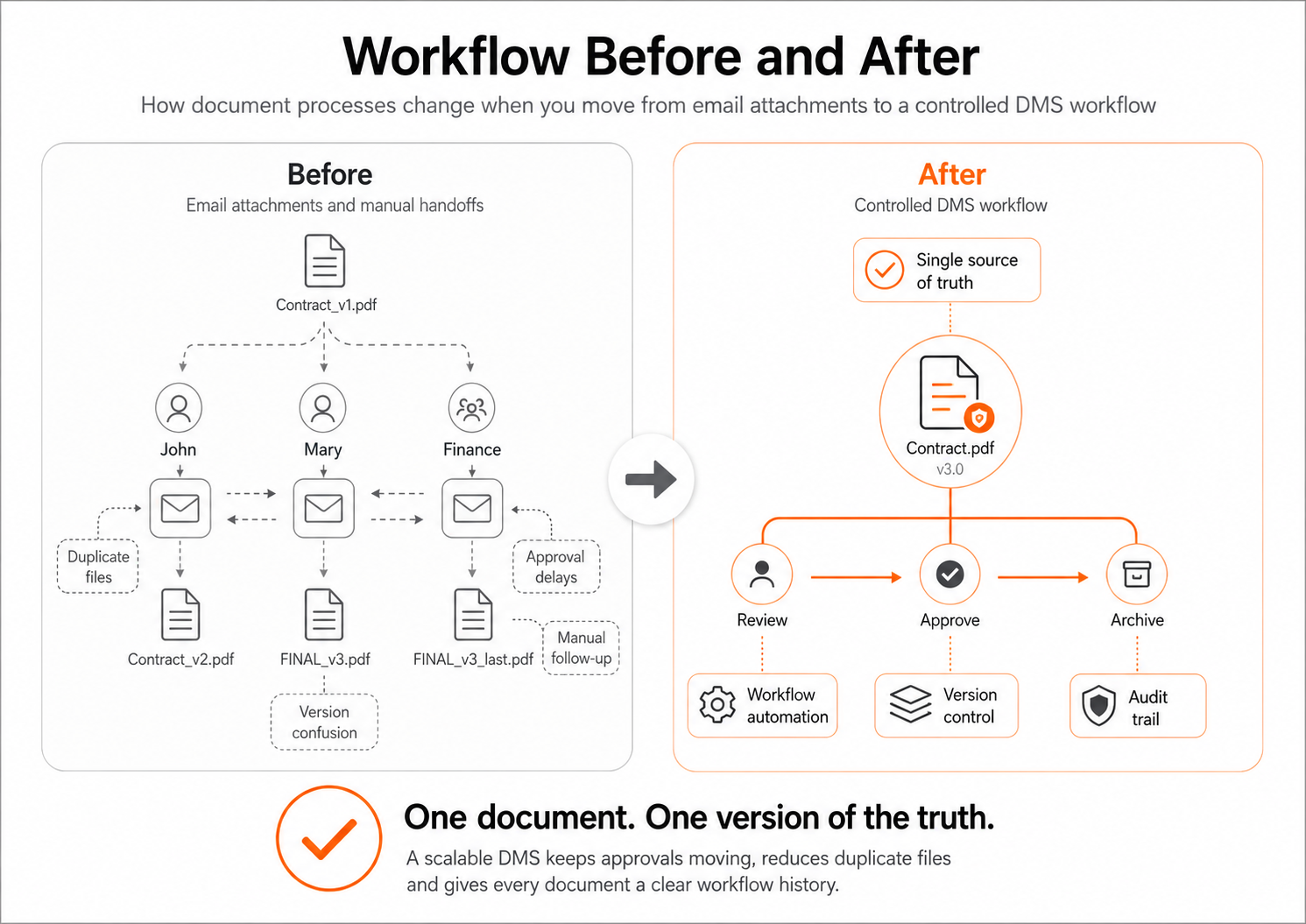
A document often changes hands before it is final. Policies require review, contracts require approval, invoices require matching and engineering documents require technical checks. Email can support these processes at low volume, but it provides little control when workloads increase or approvers are absent.
Workflow automation defines the route, responsibilities and status of each task. It can notify the next reviewer, escalate overdue actions and maintain a complete record of decisions. Version Control ensures contributors work on the current document and makes earlier versions available when needed. This reduces duplicate files, approval delays and errors caused by uncontrolled edits.
Security, records and accountability
Security should be designed around roles and responsibilities, not just folders. Finance, HR, legal and project teams may all need access to a shared record set while having different rights to view, edit, download or approve individual documents.
A capable platform supports granular permissions, authentication controls, audit trails and records handling policies. Retention rules help organisations preserve documents for the required period and apply disposal consistently afterwards. The precise requirements depend on sector, geography and internal policy, but the principle is constant: governance should be built into the process rather than added during an audit.
How to choose the right system
A successful purchase starts with the processes causing the greatest friction. Rather than beginning with a long feature checklist, identify the documents that are hard to find, the approvals that regularly stall and the records that create compliance exposure. These use cases reveal what the implementation must achieve.
Consider the full operating model. Cloud deployment may suit organisations that want rapid access and reduced infrastructure administration. On-premise deployment can be appropriate where internal policy, data residency or integration requirements demand greater local control. Hybrid-cloud options may be the better fit when teams need both flexibility and defined control over selected repositories. There is no universal answer, so deployment portability matters.
Integration should be evaluated early. A document management system may need to connect with accounting software, CRM platforms, enterprise resource planning tools, scanners, email services or custom applications. API access can prevent staff from exporting, renaming and re-uploading files between systems, which is where many avoidable errors begin.
Usability is equally important. If filing is slow or search is unreliable, users will return to desktop folders and email attachments. Ask how documents are captured, how metadata is applied and how new staff learn the process. Good configuration should make the controlled route the easiest route.
LogicalDOC supports cloud, hybrid-cloud and on-premise deployments, allowing organisations to select an operating model that fits their technical, security and business requirements without tying their document strategy to one hosting approach.
Plan implementation around adoption, not migration alone
Moving documents into a new repository is only part of the work. Before migration, decide which documents are active, which should be archived and which can be securely disposed of under the organisation's retention policy. Carrying years of duplicated, poorly labelled material into a new system can recreate the old problem in a newer interface.
Start with a department or process where the benefit is visible. Contract approvals, quality documentation, accounts payable and project records are common candidates because delays and ownership are easy to measure. Define the folder structure, metadata, permissions and workflow with the people who do the work, then test practical scenarios before wider rollout.
Training should focus on outcomes: how to save a document correctly, find the latest approved version, complete an assigned task and share information securely. IT teams need administration and integration training, while business users need confidence that the system will save time rather than create more steps.
Measure the improvement
Document management should produce evidence of progress. Useful measures include average retrieval time, approval turnaround, number of duplicate files, percentage of documents classified correctly and volume of paper storage reduced. Teams can also track overdue workflow tasks and the time spent responding to audit or customer information requests.
These measures help leaders improve the configuration over time. If search results are poor, metadata or scanning quality may need attention. If workflows are bypassed, the route may be too complex. A system should evolve with the organisation rather than remain a static archive.
The most useful document management system software is the one people trust when the pressure is on. Build it around the documents and decisions that keep your organisation moving, and every approved file, completed workflow and quick retrieval becomes a small but meaningful gain in operational control.
Related Articles
Articles - Most Read
- Beyond Document Storage: How AI Turns Document Management into an Intelligent Business Engine
- LogicalDOC 9.2.1: Verbesserte KI, höhere Sicherheit und intelligenteres Dokumentenmanagement
- RAG in Document Management Systems: Turning Enterprise Documents into Intelligent Knowledge
- AI-Native Document Processing: How IDP and Content-Centric Automation Are Transforming Document Management
- LogicalDOC 9.2.2 – Was ist neu? KI‑gestützte semantische Suche & erweiterte Sprachunterstützung