


A client asks for the latest contract, technical drawings or case file. The document is in someone’s inbox, an old shared drive and possibly attached to a chat message. Secure document sharing for clients is designed to remove that uncertainty. It gives clients quick access to the correct information while allowing your organisation to retain control over security, permissions and document history.
For operations teams, the issue is not simply sending files safely. It is creating a dependable process that prevents outdated versions, reduces repeated requests and provides evidence of who accessed sensitive information. For IT and compliance teams, it means extending access beyond the organisation without creating an unmanaged copy of the document estate.
Why email attachments create a control problem
Email remains useful for routine communication, but it is a weak foundation for sharing business-critical documents. Once a file is attached, it can be forwarded, downloaded to unmanaged devices or retained indefinitely in mailboxes. Replacing an outdated document means sending another attachment and trusting every recipient to use it.
“Security is not just about protecting documents — it’s about controlling how they move, who sees them, and what happens next.”
— Laura Mitchell, Information Governance Consultant
This creates a familiar cycle of operational delays. Staff spend time answering requests for files that have already been sent. Clients work from superseded documents. Teams cannot easily confirm whether a recipient received or viewed a file. When a dispute, audit or data-access request arises, reconstructing the history can take far longer than it should.
The risk rises when documents contain personal data, financial information, intellectual property, legal records or commercially sensitive plans. A password-protected archive may provide some protection, but it does not solve version control, permissions management or auditability. The password itself is often sent through the same email channel.
A controlled document management environment changes the model. Rather than distributing multiple copies, authorised users access a governed version held in a central repository. The organisation can update, withdraw or replace a document without losing track of what has happened.
What secure document sharing for clients should provide
A useful client-sharing process balances protection with usability. If access is difficult, clients will continue to request attachments, use personal file-transfer services or ask staff to work around the system. If access is too broad, confidential information becomes unnecessarily exposed.
The right balance depends on the document type, the client relationship and the regulatory environment. A construction project may require controlled access to changing drawings and site records. A legal team may need strict matter-based folders and detailed access history. A healthcare provider may need stronger controls around personal and clinical information. The principle remains the same: each client should see what they need, and nothing more.
Permission-based access
Permissions should be assigned at folder, workspace or document level according to a defined access model. A client may need read-only access to approved documents, while internal project managers need the ability to upload and revise files. External suppliers may require access to only one portion of a project repository.
Role-based access is particularly valuable when client teams change. Instead of managing permissions document by document, administrators can assign access to a client group and remove it when the engagement ends. This reduces the chance that former contacts retain access because an individual permission was overlooked.
Version control that clients can trust
Clients should not need to compare filenames such as “final”, “final_v2” and “final_revised”. A document management system should maintain a clear version history, identify the current approved version and preserve previous versions where policy requires it.
“Clients work faster and make better decisions when they access one trusted source of truth instead of scattered file copies.”
— David Harper, Digital Transformation Advisor
This is more than an administrative convenience. When clients can access one recognised source of truth, approvals move faster and disputes over which document governed a decision become less likely. Internal teams also gain confidence that a correction or updated specification will reach the right audience.
Audit trails and accountability
For sensitive documents, it is often necessary to know who uploaded a file, changed it, accessed it or approved it. Audit trails create that evidence without relying on scattered email records. They support internal governance and can simplify responses to client queries, quality reviews and compliance investigations.
Audit requirements vary. Some organisations need detailed event records for every action, while others mainly need to demonstrate that documents were shared through an authorised process. Build the level of tracking around the risk involved, rather than applying the same restrictive process to every file.
Expiry, revocation and controlled downloads
Client access should not automatically last forever. Time-limited access is useful for tender packs, due-diligence materials, temporary project collaboration and sensitive reports. When the period ends, access can be removed without asking recipients to delete copies from their inboxes.
Download controls also require judgement. Preventing downloads may be appropriate for highly confidential information, but it can frustrate clients who need offline access to working documents. In many cases, controlled download rights combined with clear permissions, audit records and document retention policies offer a more practical approach.
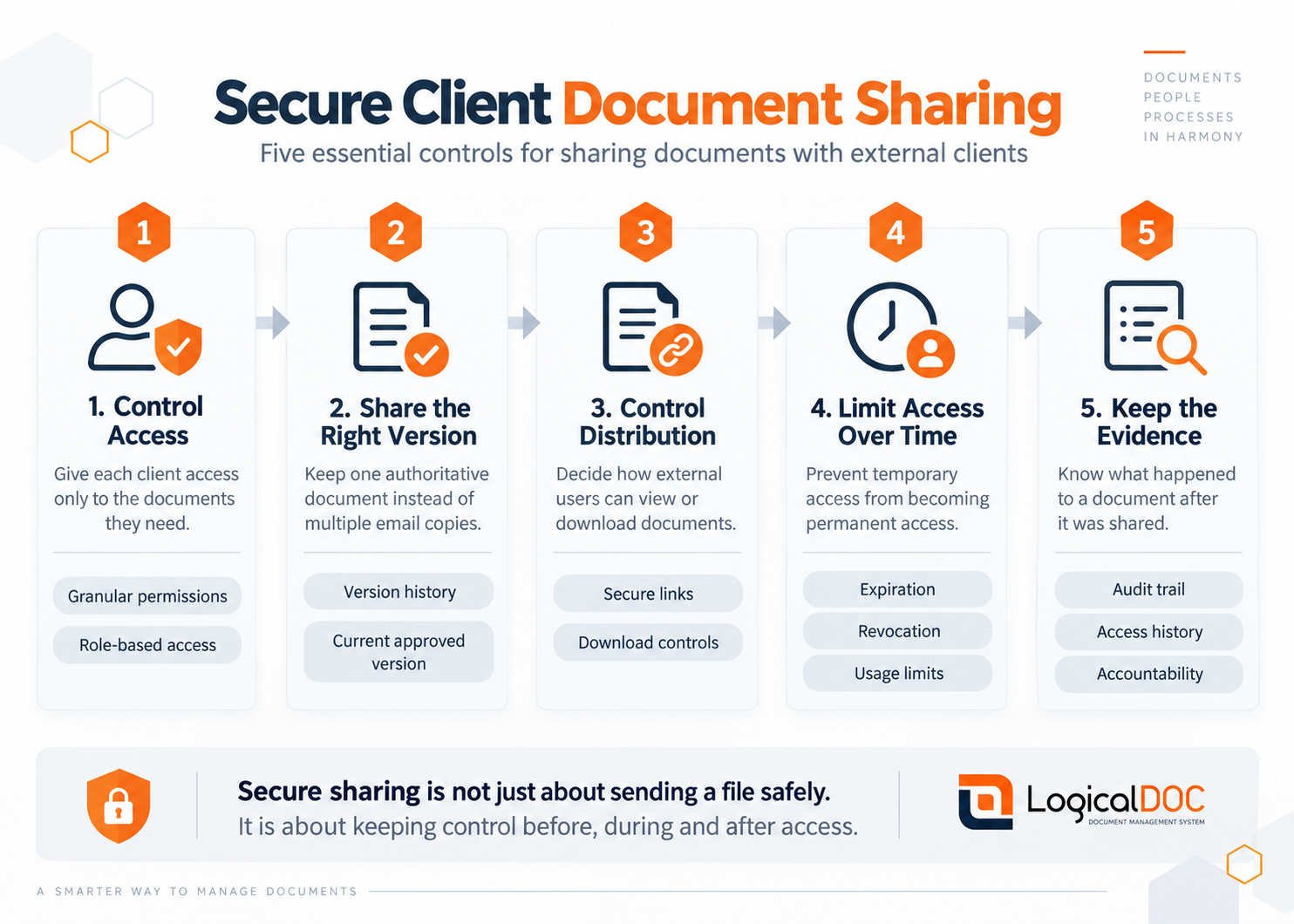
Secure sharing is not just about sending a file safely. It is about keeping control before, during and after access.
Build the process around the client journey
Technology works best when it reflects how documents move through a real client relationship. Start by identifying the documents that are regularly shared externally, who approves them and when the client needs access. This will usually expose duplicated effort, unclear ownership and folders that mix internal working papers with client-ready content.
Create dedicated client or project workspaces rather than giving external users access to broad internal directories. Within each workspace, separate approved client documents from internal drafts, notes and working files. This simple distinction protects confidential internal material and makes the client experience easier to understand.
Establish naming conventions and document statuses that are meaningful to both staff and clients. For example, a drawing may move from draft to review to approved for construction. A policy may be marked as current, superseded or archived. Clear status labels reduce reliance on informal explanations and prevent users from acting on unfinished material.
Approval workflows are especially useful when documents must be reviewed before external release. A workflow can route a contract, report or technical submission to the appropriate people, record the decision and place the approved version in the client-accessible area. This reduces the risk of a well-intentioned employee sharing an incomplete or unapproved file under time pressure.
Give IT control without creating a burden for users
Secure sharing must fit the organisation’s wider information architecture. IT teams need to consider identity management, authentication, retention, backup, encryption, hosting location and integration with existing business systems. Operations teams need quick retrieval, straightforward upload processes and confidence that clients can use the system without extensive support.
A platform that supports cloud, hybrid-cloud and on-premise deployment gives organisations more choice in meeting operational, security and data-residency requirements. The preferred model may depend on industry rules, internal infrastructure and the sensitivity of the documents involved. There is no universal deployment answer, but there should be a clear rationale for the one selected.
Integration also matters. If client documents originate in a line-of-business system, CRM platform or workflow application, manual exporting and uploading can recreate the errors the new process is meant to remove. API access and well-planned integrations can keep document creation, classification and sharing connected to existing work.
LogicalDOC supports this approach by centralising documents, applying granular permissions and maintaining version histories and audit information in a structured repository. Its modular design allows organisations to introduce the capabilities they need while retaining deployment flexibility and professional support for more complex requirements.
Common mistakes that weaken client document security
The most common mistake is treating a shared folder as a client portal without reviewing its inherited permissions. A folder can appear correctly organised while allowing users to browse material outside their intended scope. Test access from the perspective of each client role before making a workspace available.
Another mistake is focusing entirely on access controls while ignoring document quality. Securely sharing the wrong version still creates commercial and compliance risk. Combine permissions with document statuses, approval workflows and clear ownership for high-value records.
Finally, do not assume adoption will happen on its own. Give internal users a short, practical process for uploading, classifying and releasing documents. Give clients a simple explanation of where to find information and whom to contact if access fails. A system that cuts information retrieval time from hours to seconds only delivers that benefit when people use it consistently.
Start with the documents that cause the most friction
There is no need to migrate every historical file before improving the client experience. Begin with a high-volume or high-risk document process, such as project handovers, client reports, contract packs or compliance evidence. Define the access roles, approval points and retention needs, then measure how much time is spent finding, sending and correcting documents.
A well-designed sharing process gives clients a more professional experience while reducing the daily burden on internal teams. The next client request for a critical file should be answered with controlled access to the right version, not another search through inboxes.
Related Articles
Articles - Most Read
- Beyond Document Storage: How AI Turns Document Management into an Intelligent Business Engine
- LogicalDOC 9.2.1: Verbesserte KI, höhere Sicherheit und intelligenteres Dokumentenmanagement
- RAG in Document Management Systems: Turning Enterprise Documents into Intelligent Knowledge
- AI-Native Document Processing: How IDP and Content-Centric Automation Are Transforming Document Management
- LogicalDOC 9.2.2 – Was ist neu? KI‑gestützte semantische Suche & erweiterte Sprachunterstützung